Deleting a Customer/Service Group
The system allows Admins to delete a Service Group if no Bookings have yet been created.
To delete a Service group, navigate to
System > Service Groups.
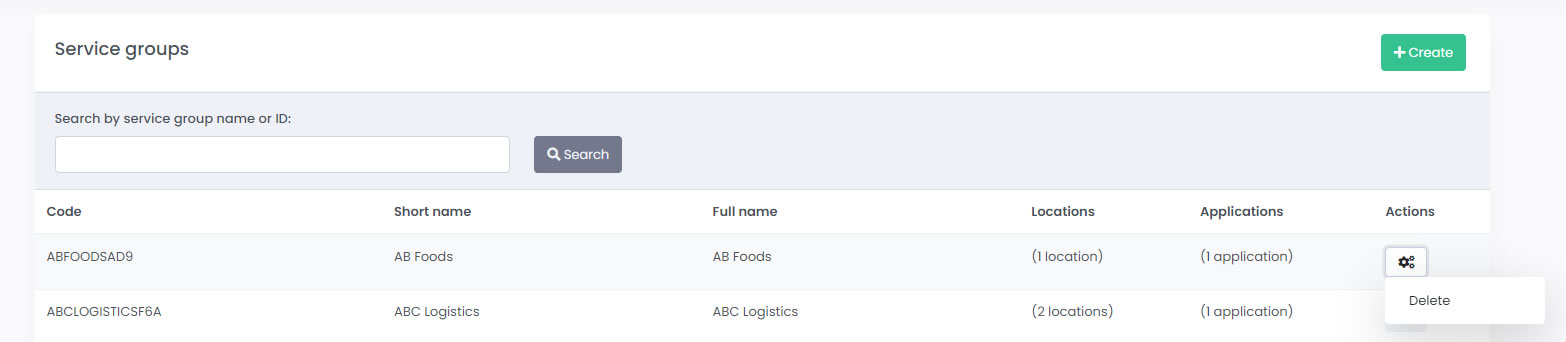
The system allows Admins to delete a Service Group if no Bookings have yet been created.
Viewing your Clinic Appointments
The Appointments screen shows the appointment status in real time.
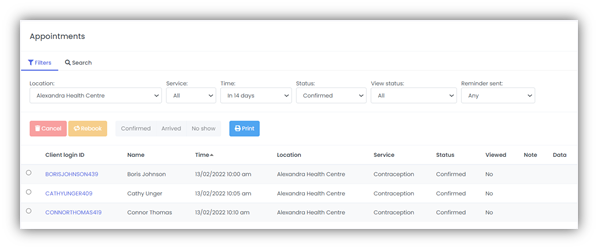
Use the Print button to print off a hard-copy record of your appointments.
The information displayed within the Appointments screen can be filtered depending on the selections made for:
- The Location of the clinic
- The Service type of the appointment
- The Time of the appointment (from a number of pre-set time options in the past, present or future)
- The Status of the appointment (e.g. confirmed, cancelled)
- Viewed status (e.g. Viewed, Not Viewed and Copied)
- If there has been a Reminder sent to the patient.
Alternatively, the Search tab allows you to search for appointments with a specific date, client name, location, or appointment ID.
The information that is displayed on the Appointments screen is as follows:
Client Login ID
The Client login ID field displays the code that uniquely identifies that patient within mCB. By default, the code is made up of a concatenation of the patient’s first and last names, as given at first use of the system, appended to a randomly generated three-digit integer. However, this code can be configured to conform to other criteria; for example, it could be the patient’s email address or mobile number.
If GoBetween is used, the Client Login ID is notified to the patient when they first register to make an appointment and is used by the patient if they log into the GoBetween patient portal.